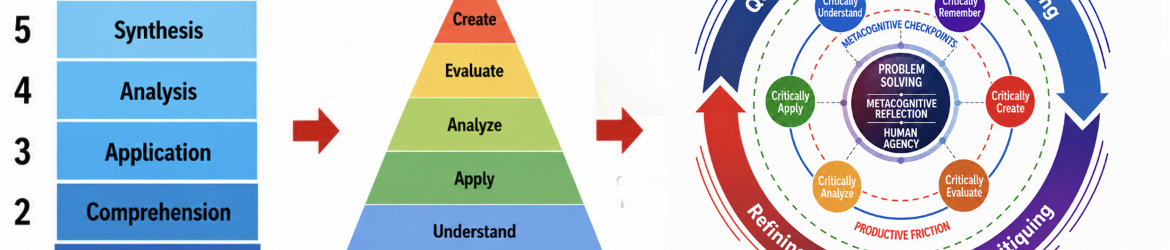
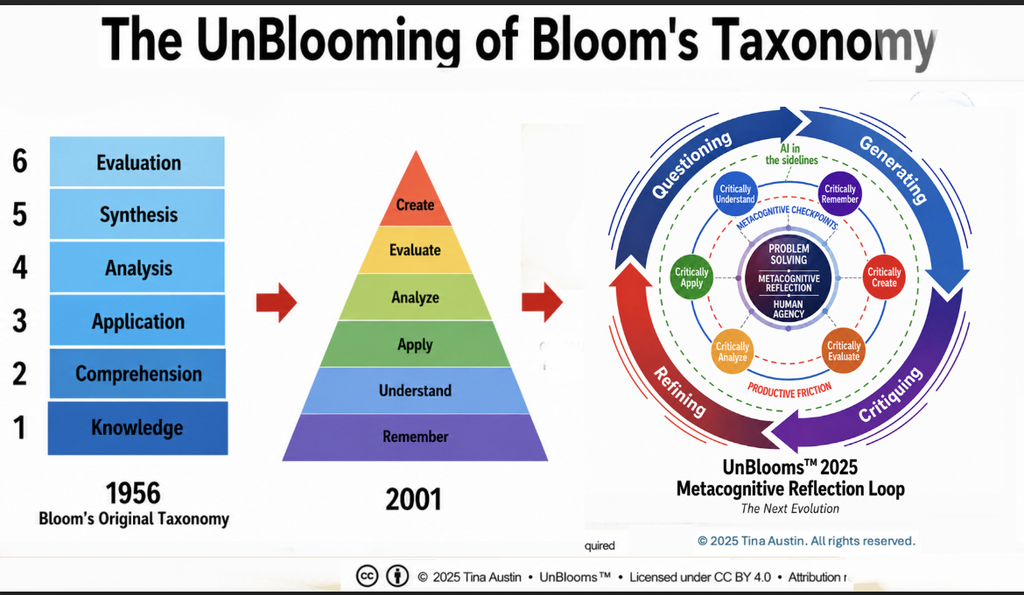
I came across this Substack post by Tina Austin who I’ve been following on LinkedIn, The Evolution of Bloom’s Taxonomy, And Where It Was Always Heading in the Age of AI and I had to learn more. Clicking the image above takes you her Unblooms site (or click here).
I pasted those two links into my personal Gemini Plus account and prompted Gemini on the Pro setting to help me learn about Unblooms. Gemini guided me through the kinds of experiences I plan to provide my 6th Math and Science students and I settled on Snorkl AI, MirrorTalk AI, and School AI. I will be using Gemini Notebooks (formerly NotebookLM) as well right from Google Classroom but for this post I did not include Gemini Notebooks.
After much explanation and giving me choices in my own learning, Gemini led me to develop decision trail graphic organizers for the AI experiences my 6th graders use. Here is Gemini’s reasoning, “In the UnBlooms framework, the goal is to grade the operation—the student’s ability to check, reject, revise, and explain—rather than just the final product. The act of catching an AI error and writing a solid defense becomes the assessable work.”
I decided to have Gemini Pro design a printable graphic organizer that kids can glue into their Math or Science notebooks and reflect on their use of the AI tool. I haven’t used these yet. What do you think? Would you use these?
Snorkl AI Decision Trail (click here if the embedded pdf file doesn’t show below):
MirrorTalk AI Decision Trail (click here if the embedded pdf file doesn’t show below):
School AI Decision Trail (click here if the embedded pdf file doesn’t show below):